AI TOOL / #08916
Kolya_extension
Chrome extensions use large language models to analyze the manipulations and deceptions present in YouTube transcripts.
Introduction
Chrome extension analyzes YouTube transcripts for manipulations and lies using LLM.
What is the YouTube Transcript Analyzer AI Chrome extension/plug-in?
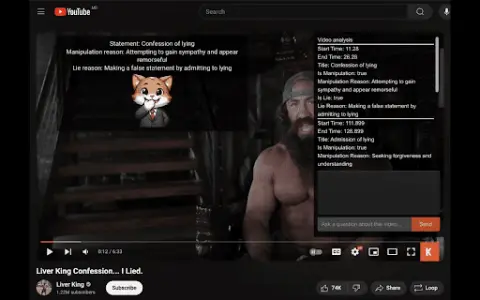
This Chrome extension utilizes large language models to analyze the transcripts of YouTube videos, identifying manipulative statements and lies. It will display a overlay on YouTube videos that provides detailed information regarding the claims made in those videos.
How to use the YouTube Transcript Analyzer AI Chrome extension?
Install the Chrome extension. Navigate to the YouTube video. The extension will automatically analyze the transcript and provide a overlay displaying information related to what is stated in the video.
The core functionality of the YouTube Transcript Analyzer AI Chrome extension/plug-in
Use LLMs to analyze the manipulation and deception present in YouTube video transcripts.
Provide overlay information on YouTube videos that offers detailed details about the content being presented.
Related
ScriptMe
Automatic transcription and subtitling platform with AI-driven tools and support for multiple formats.
Audiotype – Audio Transcription and Video Subtitles
Automatic transcription software converts audio and video into text, offering high accuracy and multilingual support.
ByteCap
An AI-powered platform designed for creating viral-style short videos, featuring automatic subtitle generation and video editing capabilities.
Colossyan Creator
An AI video platform used for creating training and workplace learning videos from text.
Coze
The AI robot and agent creation platform launched by ByteDance
Captions
AI-powered video creation and editing apps that offer automatic subtitles and a range of AI-based tools.