AI TOOL / #08846
Copy for Chat GPT
An extension used to copy ChatGPT responses and check for plagiarism.
Introduction
Extension to copy ChatGPT responses and check for plagiarism.
What is the Plagiarism Detector Extension for Chrome – an extension/plug-in for Google Chrome?
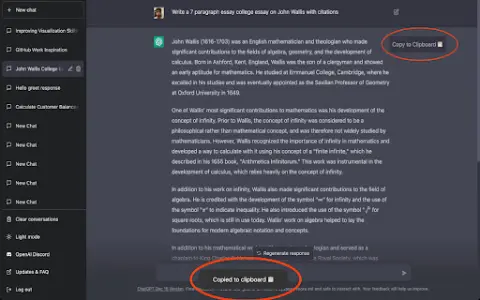
This extension allows you to copy the responses generated by ChatGPT by clicking a button or using the CMD+K shortcut key, and then have those responses checked by plagiarism detection tools.
How to use the Plagiarism Detector Extension for Chrome?
You can use this extension by clicking the copy button on ChatGPT’s response or by pressing CMD+K. The copied text will be automatically checked to determine whether it contains any plagiarized content.
The core functionality of the Plagiarism Detector Extension for Chrome.
One-click to copy the response from ChatGPT
Use the CMD+K shortcut key to copy.
Automatic plagiarism detection
Related
Multiple Grass AI Systems
Doculogy
Doculogy is an AI-powered document analysis tool that can summarize and analyze documents and answer questions using natural language.
AI Homework Helper – Apex Vision AI
Get immediate assistance with assignments using AI-powered tools such as McGraw Hill and Canvas.
Edubrain AI Homework Helper
An AI-powered assistant that helps students complete their homework
Parafact
An AI-powered real-time fact-checking tool designed to verify the accuracy of text using reliable sources.
Scholarpal Academics
Scholar Partner is an artificial intelligence-based assignment assistant designed to enhance the experience of college students. It offers step-by-step solutions to help with difficult equations and manage busy schedules, aiming to improve students' academic performance, understanding abilities, and confidence levels.