AI TOOL / #07382
Image Search
Reverse image search extension, used for finding similar images, social media content, and detecting the unauthorized use of images.
Introduction
Reverse image search extension for finding similar images, social profiles, and detecting image theft.
What is the “Find Similar Images” AI Chrome extension/plug-in?
“Find Similar Images” is a browser extension that allows users to perform reverse image searches using popular search engines such as Yandex and TinEye. It helps users locate people’s social media profiles based on their photos, identify fake or impersonated accounts on platforms like Facebook and Instagram, detect stolen or illegally republished images, find free alternatives to paid image libraries, and discover contacts from other social networks through a person’s LinkedIn profile photo.
How to use the “Find Similar Images” AI Chrome extension/plug-in?
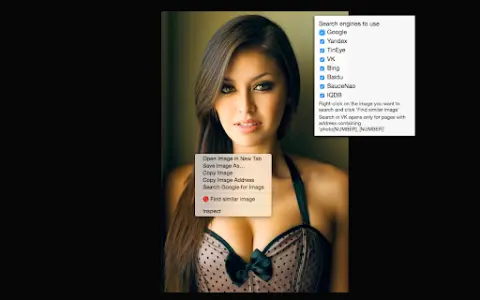
To use this extension, right-click on the image and select “Find Similar Images”. You can choose the desired search engine, or perform the search across all available engines.
The core function of the “Find Similar Image” AI Chrome extension/plug-in
Perform reverse image searches using multiple search engines.
Identifying social media profiles
Detecting impersonated and forged personal profiles
Identify images that have been stolen or illegally republished.
Finding free alternatives to paid images
Find contacts on other social networks through the photo on their LinkedIn profile.
Related
ABC News Political Channel
The political news channel of ABC News provides coverage on current political developments, videos, and analysis of election trends.
PBS LearningMedia classroom resources
Provide classroom resources for teachers and students, allowing videos, lesson plans, and games to be searched according to state and national curriculum standards.
Draw.io Online Flowchart Tool
Draw.io is a free online drawing tool that allows users to create flowcharts, process diagrams, organizational structure charts, UML diagrams, ER diagrams, and network topology diagrams.
Random Street View: Random street scenes
A website that randomly displays street photos from all over the world – truly an incredibly addictive and fun experience.
Our World in Data: Global Data
Using research and data to provide a basis for making progress in addressing the world’s most critical issues
A Brief History of the Earth: A Timeline
An interactive timeline of Earth’s history, depicting the entire process from its formation to the present day.