AI TOOL / #07222
ReadImage
Extract, edit, and copy text from images on web pages.
Introduction
Extracts, edits, and copies text from images on web pages.
What is Image Text Extractor ai chrome extension/plugin?
This extension allows users to extract text from images displayed on web pages. It supports common image formats such as jpg, jpeg, png and bmp. After extraction, the text can be edited and copied.
How to use Image Text Extractor ai chrome extension/plugin?
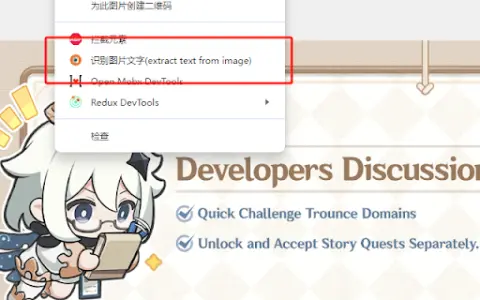
Hover your mouse over the image, right-click and select "Extract text from image". Press "Ctrl + Q" to view the extracted text on the extension page, where it can be edited and copied.
Image Text Extractor ai chrome extension/plugin core features
Extract text from images on web pages
Edit extracted text
Copy extracted text
Related
【Free】humanizeaiwork
An AI tool that transforms artificial-generated content into natural, human-written text.
Samwell.Ai
Samwell.ai utilizes cutting-edge artificial intelligence technology to revolutionize academic writing, simplifying the processes of research, drafting, and citation for both students and professionals, thereby enhancing productivity and accuracy.
essayget
AI content detector, user-friendly tools, and essay writing assistants.
SciSummary
SciSummary is an AI-powered tool designed to summarize scientific articles and research papers.
Doculator
Doculator is a free, AI-powered online tool that can be used to translate documents, images, audio files, and videos.
Lenovo Voice – audio and video translation, language learning assistance, and your perfect binge-watching companion.
Real-time translation and generation of TV- and movie-quality English subtitles.