AI TOOL / #06948
ImagePrompt – Reverse Image To Prompt
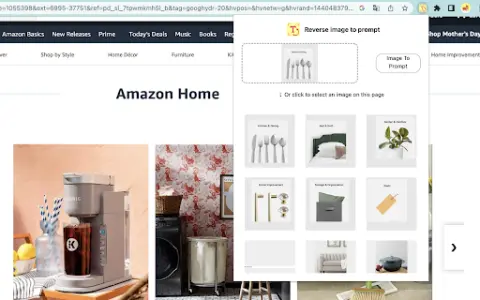
ImagePrompt converts images into text prompts and extracts images from web pages.
Introduction
ImagePrompt converts images to text prompts and extracts images from web pages.
What is ImagePrompt ai chrome extension/plugin?
The ImagePrompt extension allows users to enter any image and convert it into a text prompt. It can also extract all images from web pages and generate tips for them. It's designed for content creators, designers, and anyone who needs to provide textual descriptions for visual content. It helps generate titles, alt text, tags, analyze visual elements, explore hidden meanings, and create hints for image generation tools like MidJourney, Stable Diffusion or DALL·E 2.
How to use ImagePrompt ai chrome extension/plugin?
In just a few clicks, enter an image to convert it into a prompt. Alternatively, extract all images from a web page and generate a hint for each image.
ImagePrompt ai chrome extension/plugin core functionality
Reverse convert any image into a text prompt
Extract and analyze images from any web page
Save and share tips
Related
AXONscribe
AXONscribe is capable of quickly generating medical records from patient conversations.
Meetingtor: Record online meetings
A Chrome extension designed for recording, transcribing, and summarizing online meetings.
InterviewPrep AI
A Chrome extension for mock interviews that provides real-time transcription and AI-powered analysis.
*Collect*
An AI-powered Chrome extension designed for content planning, creation, and team collaboration.
Superpowered
AI Meeting Notes Assistant – transcribes and summarizes meetings in real-time, without the need for robots or recording devices.
Audionotes Pro
AI note-taking tools convert speech, text, and video into structured summaries and content.