AI TOOL / #06897
AddSubtitle
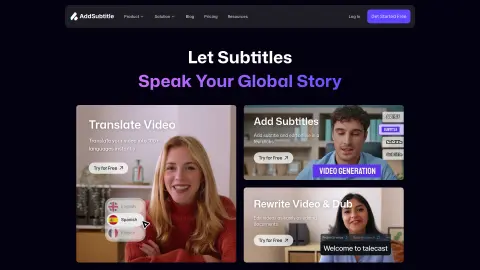
Subtitles, dubbing, and translation – all these functions are integrated into one solution to speed up your video production process.
Introduction
Subtitles, voiceover, and translation—all in one tool to speed up your video workflow.
What is AddSubtitle?
AddSubtitle allows creators to have complete control over how their information is conveyed to the world. Subtitles, voiceovers, and translations – all these features are combined in one solution to streamline your video production process. Experience the perfect balance between efficiency and creative freedom.
● Rapid Creation – Transform your work processes through intelligent automation. Generate formatted subtitles instantly, translate audio and subtitles in over 60 languages, create realistic AI-generated voices, and edit videos just as easily as you would edit text.
● Unrestricted creative freedom – Every element can be customized to the fullest extent. Choose from hundreds of natural AI voices, or clone your own voice to add a personal touch. Fine-tune subtitle styles, positions, and sizes with pinpoint accuracy. Translate content whenever you need it. No software required; all that’s needed is pure creative talent, available anytime, anywhere.
How to use AddSubtitle?
First, navigate to your dashboard and select the workflow you wish to use: add subtitles, translate a video, add voiceover, or rewrite the video content. Upload your media files, customize the settings to match your requirements, and then click “Submit” to start the processing. Once it is completed, click on your project to access the editing panel, where you will find powerful tools such as bilingual subtitles, subtitle editing, voice cloning, voice translation, and other advanced features to enhance your content. If you need additional support or wish to adjust your personal settings, click on the profile icon in the top right corner. You can also join our thriving Discord community to gain creative tips, inspiration, and direct assistance from other creators.
The core functionality of AddSubtitle
Supports automatic subtitle generation in over 60 languages.
Precise subtitle translation
AI voice translation and dubbing with context awareness
AI voice synthesis with natural sound quality
Clone the sound from a 10-second recording.
Edit a video by modifying its text content.
Cloud-based, no need for installation
It can be edited via a YouTube link.
Related
Math Vibe Laboratory
05 · Strange creatures mentioned in ancient books about demons and ghosts—someone actually went to the effort of creating a database about them.
Pocket Cloud
As shown in the figure, users can filter search results by time, cloud storage type, or file size. Compared to other search engines, this system displays detailed information about some files in its search results. For users with specific search criteria, this feature allows them to quickly eliminate irrelevant results, which is quite useful.
CyberChef
Cobalt is an open-source online media download tool that supports mainstream platforms such as YouTube, Twitter, TikTok, Instagram, and Bilibili. It features no ads or tracking capabilities; you can simply paste the link to start downloading the content.
Typing Race |
An online typing game where you can compete with strangers from around the world in typing speed. The faster you type, the further your car will move forward in the race.
Online and free tool for converting PDF files to Word documents
The free version of the Xunjie Online PDF to Word converter provides you with free online services for converting PDF files into WORD documents, converting WORD files into PDFs, and converting PPT files into PDFs. It is a completely free online conversion tool that allows you to effortlessly convert PDFs and WORD files online. It is lightweight, requires no installation, and is entirely free to use.
Uncle Wen
Uncle Wen – File Sharing: Find Uncle Wen for unlimited-speed file transfer. Uncle Wen is a cloud storage service that offers 40GB of free online storage space. It supports functions such as sending and receiving files, as well as advanced features like viewing transaction history.