AI TOOL / #06782
Betafi: Record, Add Notes, Transcribe Calls
Betafi enhances the experience of Google Meet™ through recording, transcription, and AI-based summarization – all completely free of charge.
Introduction
Betafi enhances Google Meet™ with recording, transcription, and AI summaries for free.
What is the BetaFi AI Chrome extension/plug-in?
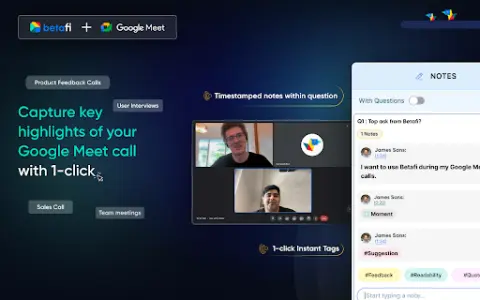
Betafi is a Chrome extension that enhances the experience of using Google Meet™ by allowing users to record conversations, capture key moments, mark teammates for feedback, and obtain audio recordings, automatic transcriptions, as well as summaries generated by GPT-4. The features it offers are designed to improve the organization and efficiency of meetings, both during and after they take place.
How to use the Betafi AI Chrome extension/plug-in?
Install the Betafi Chrome extension and use it during Google Meet™ calls to record audio, highlight key points, make annotations, and take notes. After the call is over, you can access the recorded audio, transcriptions, and summaries.
The core functions of the Betafi AI Chrome extension/plug-in
Automatically record and download Google Meet™ calls.
GPT-4 conversation summaries generated by AI
Supports transcription in over 30 languages.
Supports transcription and translation in over 150 languages.
Create short video clips
Timestamps and highlights of significant moments
Notes with timestamps
Share via public links
Action Point Review and Editing
Stakeholder labeling
Related
Lazybird
The AI voice synthesis generator produces voices in human-like styles, which can be used for various types of content creation.
VideoGen – AI Video Generator
AI video generator to quickly create and edit videos with no skills required.
Translate and Speak Subtitles for YouTube
Read YouTube subtitles aloud using AI-powered text-to-speech in multiple languages.
UniDub.co
UniDub is a multilingual AI dubbing platform for videos, audiobooks, and podcasts in 45 languages.
YouTube Dubbing
A browser extension designed for translating and dubbing foreign-language videos, suitable for use on YouTube and other platforms.
autocut.com
An AI plugin for Premiere Pro and DaVinci Resolve that automates video editing tasks.