AI TOOL / #05444
OpenAI Usage Insights (For Developers)
Chrome extension for efficient monitoring and analysis of OpenAI usage data.
Introduction
Chrome extension to monitor and analyze OpenAI usage data effectively.
What is the OpenAI Usage Insights ai chrome extension/plugin?
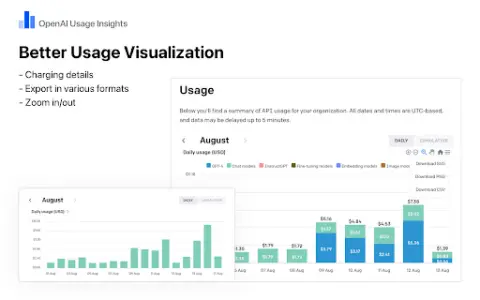
OpenAI Usage Insights is a Chrome extension designed to provide deeper visualization of OpenAI usage. It allows users to effectively monitor and analyze their usage data, providing a comprehensive overview of each model's monthly costs through intuitive stacked charts. The extension also supports seamless export of monthly usage data for further analysis and recording, ensuring a safe and reliable usage experience.
How to use OpenAI Usage Insights ai chrome extension/plugin?
1. Install OpenAI Usage Insights from the Chrome Web Store and ensure it is enabled.
2. Navigate to https://platform.openai.com/account/usage and log in to access the usage dashboard.
3. Optimized charts will appear seamlessly on your screen, allowing you to drill down into specific data or export it.
OpenAI Usage Insights ai chrome extension/plugin core functionality
Get a comprehensive overview of each model's monthly costs with stacked charts.
Seamlessly export and save monthly usage data for further analysis and documentation.
Related
ToolFK AI Image and Video Tools
Free AI image and video tools: Image-to-video, Text-to-image, and Image-to-text conversion services that allow users to generate and download results online.
Connections Academy Online Public School
A free, accredited K-12 online public school that shows how students can thrive through personalized learning at home.
ProgrammerHumor: Funny memes for programmers
Collect the best memes, jokes, and humorous materials related to programmers for developers and technology enthusiasts.
Hack Design course
A set of design courses that are easy to follow: Every week, a design lesson created by professional designers will be sent to your email. You can learn at your own pace and apply what you’ve learned in your actual work.
NASA Image and Video Library
NASA’s image and video library aggregates all visual resources in one searchable location, offering the option to download images in various sizes and resolutions. Users can also view the metadata of these images, including EXIF information related to the shooting details.
Monkeytype typing test
A minimalist yet customizable typing test website with an extremely rich set of features: various self-testing modes, progress tracking, and speed improvement options.