AI TOOL / #05336
Legal Red Flag Detector
A Chrome extension that uses AI to identify potentially problematic elements in legal documents.
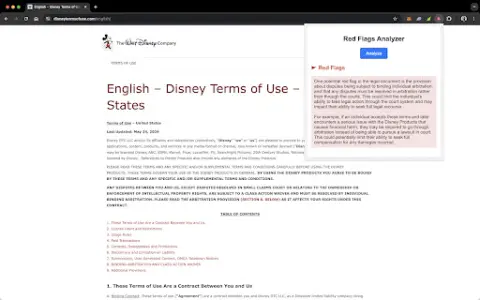
Introduction
Chrome extension that uses AI to detect red flags in legal documents.
What is the Legal RedFlag Detector AI Chrome extension/plug-in?
The Legal Red Flags Detector is a Chrome extension designed to identify potential red flags in legal documents, such as terms of service, privacy policies, and user agreements. It utilizes AI technology to highlight clauses that may be harmful to users and provides clear explanations, eliminating the need for legal expertise.
How to use the Legal RedFlag Detector AI Chrome extension/plug-in?
Install the extension, open the web page containing the legal document, and click “Analyze” in the pop-up window. This will display highlighted sections marked with red flags, along with simple explanations.
The core functionality of the Legal RedFlag Detector AI Chrome extension/plugin
Automatic analysis of legal documents
Prominent clauses regarding potential issues
A popular explanation of the red flag
Intuitive interface in the pop-up window
Related
InFold
An AI-driven work assistant designed for unified search and knowledge discovery.
Youtube Video Summary
Use OpenAI to automatically generate summaries for lengthy transcription texts, and it supports multiple languages.
Point Is: AI Summary & Search
AI-based tools designed for summarizing and searching various types of files.
Vulse
A B2B employee communication platform and a LinkedIn content management system, both equipped with AI-powered tools.
AI Summary Pro: Instant Text & Page Insights
Chrome extension that provides AI functionality for web and PDF summarization in multiple languages.
FTech Summarizer
A Chrome extension for summarizing online content using OpenAI technology.