AI TOOL / #04208
Shift-Ctrl-F: Semantic Search for the Browser
A Chrome extension that uses MobileBERT to search for and highlight answers on web pages.
Introduction
Chrome extension using MobileBERT to search and highlight answers on webpages.
What is the Shift-Ctrl-F Chrome extension/plugin?
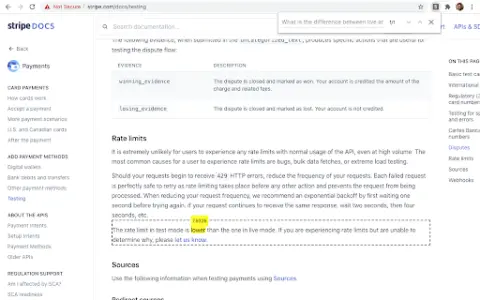
Shift-Ctrl-F is a Chrome extension that utilizes the MobileBERT model, which has been fine-tuned using the SQuAD dataset. This extension uses TensorFlowJS to search for answers on web pages and identify relevant elements. It allows users to enter natural-language queries and find corresponding answers within the content of the current page.
How to use the Shift-Ctrl-F Chrome extension/plugin?
1) Open the extension pop-up window using the toolbar or shortcut key (Shift-Ctrl-F).
2) Enter your natural language query in the search box.
3) Press Enter and wait for the model to return the results.
The core functionality of the Shift-Ctrl-F Chrome extension/plug-in.
Conduct natural language question-and-answer interactions on web pages.
Highlight relevant elements based on the search query.
Efficient processing using MobileBERT
Related
Salesmate CRM
AI-powered CRM systems enable automation in areas such as sales, marketing, and customer support.
Defi Lens
DeFi Lens: an AI-powered crypto analytics tool for real-time market intelligence and strategy building.
Gunbot.com
Self-hosted cryptocurrency trading bot that supports automated trading on multiple exchanges and protects privacy.
ApexAlgo
Artificial intelligence-based trading tools provide accurate signals that help in making informed trading decisions.
TradesViz
An integrated online transaction log, equipped with advanced analysis and simulation tools.
hostyAi
HostyAI is an AI assistant for property management that automates interactions with guests, thereby reducing response times.