AI TOOL / #04201
Edstension
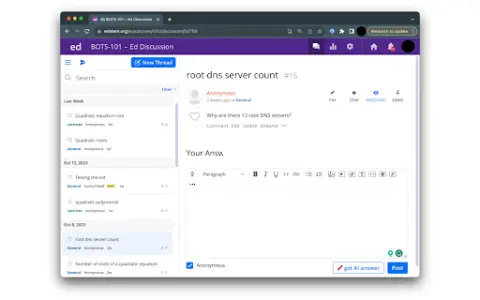
Chrome extensions for EdStem and Moodle offer AI-generated answers as well as LaTeX preview functionality.
Introduction
Chrome extension for EdStem & Moodle providing AI answers and LaTeX previews.
What are the EdStem & Moodle AI Assistant Chrome extensions/plugins?
This Chrome extension integrates with EdStem and Moodle, providing educators with an AI-assisted tool. It adds a button to the forum interface that enables AI-generated answers to student questions and real-time LaTeX previews, thereby enhancing work efficiency and the quality of responses provided by educators.
How to use the EdStem & Moodle AI Assistant Chrome extension/plug-in?
Install the Chrome extension. It will automatically detect both the EdStem and Moodle platforms and add a button to the forum interface. By clicking this button, you can generate answers powered by AI technology and view previews of your LaTeX documents.
The core functions of the EdStem & Moodle AI Assistant Chrome extension/plug-in
Suggestions for AI-powered forum Q&A systems
Real-time LaTeX preview
Seamless integration with EdStem and Moodle
Related
Ministry of Human Resources and Social Security
Official ministry site for employment, social insurance and qualification policies.
CreativeMode
No need to write code; use AI to create my own Minecraft mod.
Essential for programmers: The journey of a request
A set of interactive system design courses: Each concept is presented through dynamic illustrations, guiding you through a step-by-step exploration of topics ranging from load balancing and caching to sharding, consensus mechanisms, queues, as well as the design of complete systems that can support millions of users, starting from a single server.
SaaS Toolkit
SaaS-based analysis, automation, and AI-powered customer service
ToolJet
An open-source platform for building AI tools and systems
aiteam.space
Each agent has its own container and email address.