AI TOOL / #04050
AI Roundtable
Ask a question and receive answers from multiple AI assistants.
Introduction
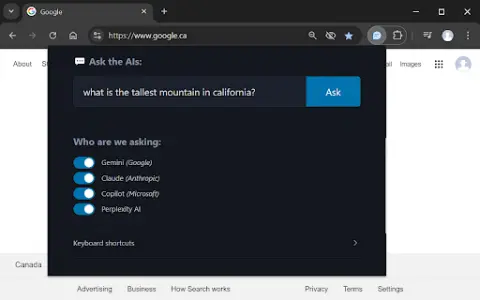
Ask one question, get answers from multiple AI assistants.
What is a Multiple AI Assistants Chrome extension/plug-in?
This website allows users to submit questions at once and receive answers from multiple AI assistants. Users can customize which assistant they want to use for their queries. The website also provides keyboard shortcuts, making it easy to access various functions quickly.
How to use the Multiple AI Assistants Chrome extension?
Use the shortcut keys Ctrl/Cmd + Shift + Q to open the query window and start typing your question. Use Alt + 1 to switch to Gemini, Alt + 2 to switch to Claude, Alt + 3 to switch to Copilot, and Alt + 4 to switch to ChatGPT.
The core functions of various AI Assistant extensions/plugins for Chrome.
Query multiple AI assistants simultaneously
It is possible to customize the selection of AI assistants.
Convenient and fast keyboard shortcuts
Related
RIZZ AI
The AI dating assistant helps to improve conversations and increase the chances of successful dates.
TalkingPdf.io – Chat with any PDF
Chat with PDFs using AI to quickly find answers and summaries.
Zappr.AI
An artificial intelligence-based chatbot platform used for document analysis and search, capable of handling natural language interactions.
HybridAI
HybridAI: AI chatbot with emotional awareness, function invocation and human takeover.
ChatGPT on Telegram
Access ChatGPT within Telegram to obtain answers and assistance quickly.
ZykaAI
An AI-driven digital adoption platform designed for SAAS websites, aimed at enhancing user experience and providing greater support.