AI TOOL / #03153
Heyboard: Your AI-Powered Personal Workspace
Heyboard aggregates, organizes, and connects knowledge from various sources.
Introduction
Heyboard centralizes, organizes, and connects your knowledge from various sources.
What is the Heyboard AI Chrome extension/plug-in?
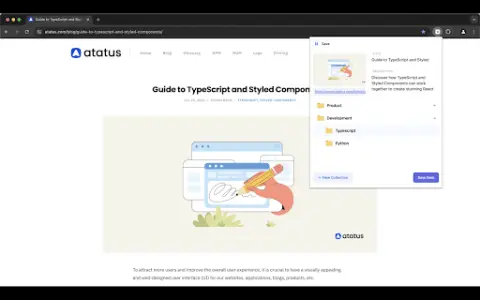
Heyboard enables you to manage your knowledge in a centralized manner, making it readily usable and easily integrated into your work流程. It allows you to save content from any source and in any format, and then organizes it for you. Its advanced search functionality helps you retrieve information more quickly, while its AI features are designed to create connections between different pieces of saved content. You can also add additional context to the information as needed by using functions such as highlighting, commenting, and taking built-in notes.
How to use the Heyboard AI Chrome extension/plug-in?
Save content from any source and in any format onto Heyboard. The platform will automatically organize it for you. Use advanced search functions to quickly find the information you need. Add context by using features such as highlighting, commenting, and taking notes. Let AI help create connections between the saved contents.
The core functions of the Heyboard AI Chrome extension/plugin
Centralized knowledge management
Save content from any source and in any format.
Automatically organized and saved content
Advanced search functionality
AI-generated content links
Highlighting and commenting
Built-in note-taking function
Related
Answers: Q&A Encyclopedia
Answers is the place where you can find answers and ask questions.
University of the People: an online university with no tuition fees
Obtain a degree through flexible, tuition-free online programs and receive high-quality higher education anywhere you wish. To date, 170,000 students have already joined these programs.
WikiArt: An Encyclopedia of Visual Arts
WikiArt is an excellent resource for finding information about art online. You can browse paintings and photographs in its searchable image database, as well as read biographies of artists and learn more about their works.
Collection of OverAPI Quick Reference Manuals
OverAPI compiles various reference tables, providing you with everything you need in one place.
WallpaperWaifu: Dynamic wallpapers
Collect a large number of free dynamic and animated wallpapers to make your computer desktop and home screen more lively and interesting.
Geek Prank Simulation Tool
An online Windows XP emulator that allows you to secretly switch it to full-screen mode while your friend is away, thus making it appear as if their computer is still running the outdated XP operating system.